
What happens to your WhatsApp when you die
WhatsApp has no memorial setting, no legacy contact and no process that hands a dead person's account to anyone. This guide gives you WhatsApp's own deletion rules, checked October 2, 2026, the steps a family should take in the first week, and the way to save the voice notes before they are gone.
When you die, your WhatsApp passes to no one. Nobody can log in for you, Meta cannot read your encrypted chats, and WhatsApp generally deletes an account after 120 days without a connection, or 365 days in the US. Your chats survive only on the phone and its backup, so the family's first job is to keep that phone safe.
WhatsApp after a death | What WhatsApp says | Source, checked October 2, 2026 |
|---|---|---|
Who can take over the account | No one. WhatsApp publishes no process for a deceased user's account and no legacy contact | |
Inactivity deletion | Accounts are "generally deleted after 120 days" without a connection, and after 365 days for US accounts | |
What counts as inactive | Not connecting to WhatsApp; an open app with no internet connection still counts as inactive | |
Chats already on the phone | Stay on the device until WhatsApp is deleted from that device | |
After deletion | WhatsApp "can't restore or transfer chats, documents, media files, backups, or call history from deleted accounts" | |
A deactivated account | Deleted 30 days after deactivation | |
Signs the account is gone | "WhatsApp profile removed automatically", or the profile photo disappears | |
The 45-day rule | A number unused for 45 days and then registered on a new phone is treated as recycled, and the old profile photo and About are removed |
WhatsApp is the most personal app on most phones, with more than 3 billion people using it every month, according to Mark Zuckerberg on Meta's results call reported by TechCrunch on May 1, 2025. It is also one of the apps that keeps the least after a death, because WhatsApp stores your conversations on your devices and in your own backup, never on a server a family can ask for. That design protects your privacy every day you are alive, and it means the people you leave behind have a window measured in months to save what matters. The rest of this guide shows a family how to use that window, and shows you how to make sure the most valuable thing in those chats, your voice and the person behind it, never depends on a phone in a drawer.
By Chris Williams, founder of Idy®, the company behind Afterlife.ai™. First published June 8, 2026. Updated October 2, 2026.
Your voice notes live on one phone.
Your Persona keeps your voice and your stories on purpose, with your executor named.
Build your Persona free, no cardDefinitions
Inactive WhatsApp account: an account that has not connected to WhatsApp's servers; WhatsApp generally deletes one after 120 days, or 365 days in the US.
Export chat: WhatsApp's built-in way to save a copy of one conversation as a text file, with or without its most recent media.
Persona: the AI version of you that you build on Afterlife.ai™ while you are alive, from your own memories, values and cloned voice.
Executor Lock™: Idy's patent-pending system of named executors, Trusted Contacts, a verified death report and a sealed snapshot of your Persona that can never be changed.
What happens to a WhatsApp account when someone dies?
Nothing happens to a WhatsApp account on the day someone dies, because WhatsApp has no way of knowing. The account stays registered to the phone number, the profile photo and About line stay visible to contacts, and messages keep arriving on the phone for as long as it connects. The deletion clock starts from the last time the phone connected to WhatsApp, which for most families is the day the phone runs out of charge or the number is cancelled. Once the clock runs out, WhatsApp generally deletes the account, removes it from every group and erases what was stored with it.
Two things survive the deletion. The first is everything already saved on the phone, because WhatsApp's help page says content stored locally on a device "will remain until WhatsApp is deleted from the device" (WhatsApp, About inactive account deletion). The second is the copy each friend and relative holds of their own chats with the person who died, since every conversation lives on both ends. That second copy matters more than most families realize, because a sister, a best friend or a grandchild may hold years of voice notes that never appear on the phone you are holding. The account itself never passes to anyone, because WhatsApp publishes no deceased-user form, no memorialization and no legacy contact.
How long does WhatsApp keep an inactive account?
WhatsApp generally deletes an inactive account after 120 days, and after 365 days for accounts in the US. Both numbers appear in WhatsApp's own help article on deleting an account, which says "Inactive accounts are generally deleted after 120 days (365 days for US)" (How to delete your account, checked October 2, 2026). Inactivity means the account has not connected to WhatsApp, and WhatsApp spells out that a phone with the app open but no internet connection still counts as inactive. WhatsApp also says it may delete some accounts sooner, such as ones created only to claim a username. A family should treat 120 days as the working deadline even in the US, because the number may be registered abroad and "generally" leaves room for change, so the safest plan is to finish every rescue step within the first month.
WhatsApp is one of several services that now run a clock on accounts nobody uses, and the clocks differ by a factor of six. The table and chart compare the official numbers, each read on the company's own page on October 2, 2026. We keep this comparison here and link it from our other guides, including the ones for Grok, ChatGPT, Microsoft and Gmail.
Service | Inactivity clock | What the company may do | Source |
|---|---|---|---|
WhatsApp, outside the US | 120 days | Delete the account | |
WhatsApp, US accounts | 365 days | Delete the account | |
Grok (SpaceXAI) | More than 120 days | Delete the account without notice | |
ChatGPT, free accounts | Over a year | Terminate the account, with advance notice | |
Outlook.com and OneDrive | 1 year | Freeze the account, then delete email and files shortly after | |
Microsoft account | 2 years | Close the account | |
Google Account | 2 years | Delete the account and its data |
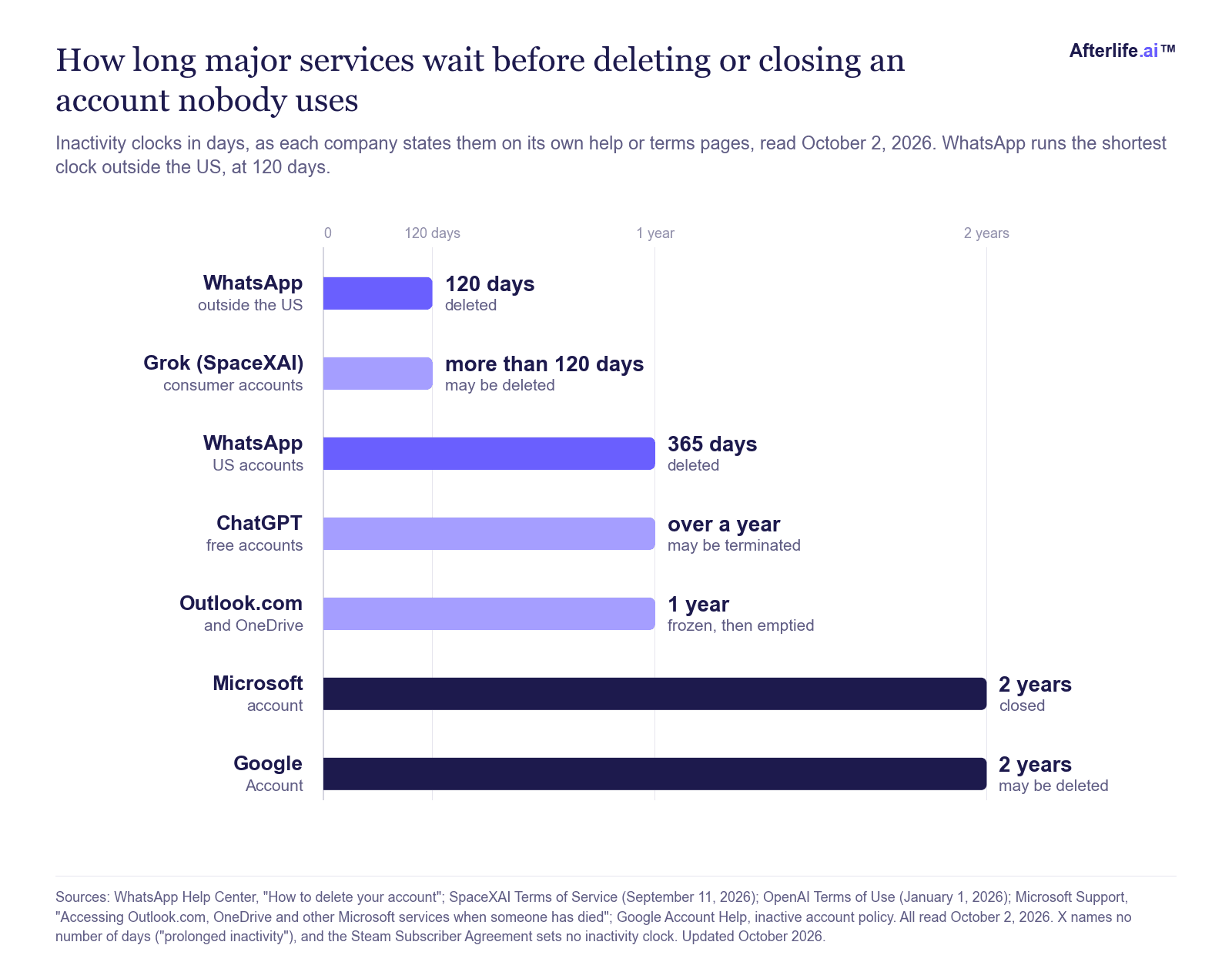
Does WhatsApp delete accounts after 45 days?
No, WhatsApp does not delete accounts after 45 days, and the 45-day figure that circulates online comes from a different WhatsApp rule about recycled phone numbers. Mobile carriers reissue numbers that stop being used, so WhatsApp watches for a number that sits unused for 45 days and then appears on a new phone. In that case WhatsApp treats the number as recycled and removes the old account data tied to it, such as the profile photo and About section (WhatsApp, About seeing your phone number already in WhatsApp).
The same help page says the previous owner of a number "has no access" to the new owner's account and that the new owner's conversations stay secure, which also works in the other direction. A stranger who is later given a dead person's number registers a fresh account and does not receive the old chats, because those chats were never stored on WhatsApp's servers. The rule came up in India in 2023, when the Supreme Court heard that phone numbers there are deactivated after 90 days without use and that WhatsApp cleans old data after 45 days (Deccan Herald, November 3, 2023). For a family, the practical lesson concerns the phone number, because WhatsApp may treat the old account as recycled the moment a new owner registers a reissued number, so keeping the number active is the cheapest way to protect what is left.
Can family read a dead person's WhatsApp messages?
Family can read a dead person's WhatsApp messages only from the person's own unlocked phone or from a backup the family can restore, and from no other source. WhatsApp's personal messages are end-to-end encrypted, which means the readable copies exist only on the devices in the conversation, and WhatsApp cannot hand a family messages it was never able to read. A court order, a death certificate or a letter from an estate lawyer does not change that, because there is nothing in readable form for WhatsApp to produce.
If you know the phone's passcode, the chats are on the phone right now. If the person used an iPhone, an Apple Legacy Contact they named can request the iCloud data that holds the WhatsApp backup, as our guide to what happens to iCloud when you die explains. If the phone is locked and nobody was named, read how to unlock a deceased person's iPhone before you try anything that could trigger a reset. The route most families forget is the other end of every chat, since each friend, sibling and grandchild already holds their own copy and can export it in under a minute.
What should you do with a loved one's WhatsApp after they die?
Keep the phone safe and the number alive first, then save the chats and voice notes, and close the account only when everything is copied. The order matters because WhatsApp's deletion page is blunt, saying it "can't restore or transfer chats, documents, media files, backups, or call history from deleted accounts" (WhatsApp). Most families can finish these eight steps in a weekend.
Keep the phone safe and charged, and do not reset it. A factory reset or deleting the app removes the chats stored on the device, and those copies may be the only full record.
Keep the phone number active with the carrier. Pay the plan for a few more months or move the number to a family plan, so the number is not reissued while you work.
Unlock the phone and keep WhatsApp connected. A connection keeps the account active, and you need the open app to export anything.
Export the chats that matter, with media. On Android, open the chat and tap More options > More > Export chat > Include media; on iPhone, tap the contact or group name > Export chat > Attach Media (WhatsApp).
Save every voice note one by one. An export attaches only the most recent media, so the older voice notes need to be saved individually, as the next section explains.
Find the Google or iCloud backup. Android phones back up WhatsApp to the person's Google account, and iPhones back up to iCloud, so note which one exists and who can reach it.
Ask friends and family to export their own chats. A short message to the family group asking everyone to export their chats with the person, with media, often recovers more than the phone itself.
Delete the account only when everything is saved. Deleting erases the message history and the Google backup, so treat deletion as the last step, if you take it at all.
If the account was a business number or a shared family phone, keep it running while you decide. For every other account the person held, our guide to every digital account after death gives the order of work.
What happens to WhatsApp groups and the person's number?
When a WhatsApp account is deleted, the person is removed from every group they belonged to, and their message history is erased from the account. WhatsApp's deletion page lists "Delete you from all of your WhatsApp groups" among the effects of deletion (WhatsApp). The messages the person already sent remain on the phones of the other members, so a family group chat keeps every photo and voice note the person shared there, as long as the other members keep their own phones and backups. The phone number itself belongs to the carrier, and if the carrier reissues the number, WhatsApp's 45-day recycled-number rule applies once the new owner registers it, so keeping the number active for a few months gives the family time to finish every step above.
How do you save WhatsApp voice notes before they are lost?
You save WhatsApp voice notes by saving each one as its own audio file, because a chat export carries only the most recent media and leaves older recordings behind. WhatsApp's own export instructions say that choosing Include media on Android adds "the most recent media sent" as attachments, and on iPhone "the most recent media from the chat" (WhatsApp). In a conversation that runs back years, the oldest voice notes, often the ones a family wants most, are exactly the ones that need saving by hand.
The method is the same on both phones and takes a few minutes per chat. Open the conversation, scroll back to the oldest voice note you want, and use the phone's share or forward option on that one message to save the audio to your own files, a cloud folder or an email to yourself. Rename each file with the sender, the date and a few words about what was said, such as "Mom 2024-03-17 birthday song", because a folder of unnamed audio files is very hard to search later. Save the finished folder in three places, two drives you own and one cloud account you control.
Voice notes are often the part of WhatsApp a family values most, and they deserve the same care as a voicemail. Our guides to how to save a voicemail forever and the voicemail you can't delete cover file formats and long-term storage in more depth.
What happens to WhatsApp backups after death?
A WhatsApp backup survives only as long as the cloud account that holds it, and only someone who can open that account can restore it. Android backups live in the person's Google account and iPhone backups live in iCloud, so Google's and Apple's rules decide who can reach them, and Google may delete an account inactive for two years (Google Account Help).
Restoring a backup also needs the phone number, because WhatsApp sends a verification code to the number before it restores anything. If the person turned on end-to-end encrypted backups, which WhatsApp added in 2021, the backup is locked with a password or a 64-digit key that WhatsApp does not know (TechCrunch, September 10, 2021). Without that key the backup cannot be opened by anyone, which is why the key belongs in a password manager your executor can reach. Our guide to what happens to a password manager after death explains emergency access, and Google Inactive Account Manager explains the Google side.
How do you protect your own WhatsApp for your family?
You protect your own WhatsApp by saving the chats and voice notes that matter now, keeping your backup reachable, and naming the person who will deal with your phone. The steps below take about an hour once and a few minutes a year after that. They work for any WhatsApp user, in any country.
Export your most important chats once a year. Start with your partner, your children and your parents, and save the files with your other family records.
Save the voice notes you would want your family to keep. Use the one-by-one method above for the recordings that capture you best.
Keep your backup on, and record where it lives. Write down whether your backup is in Google or iCloud, and store any backup password or 64-digit key in a password manager with emergency access.
Set up the Apple or Google legacy tools. An Apple Legacy Contact can request your iCloud data after your death, and Google Inactive Account Manager can share your Google data with up to 10 people after a waiting period.
Name a digital executor. Choose one person to handle your phone, your number and your accounts, and tell them where your instructions are. Read what a digital executor does for the role in full.
Write your wishes down. Say whether you want your WhatsApp kept, exported or deleted, and whether your family group should be told.
Decide now who takes over, so your family never has to guess.
Name your executorDoes WhatsApp have a legacy contact?
No, WhatsApp has no legacy contact and no memorialization, and its help center publishes no process for the account of someone who has died (searched October 2, 2026). That sets WhatsApp apart from Facebook, where you can choose one legacy contact to look after a memorialized profile, and from Instagram, whose Help Center now documents a legacy contact and a Delete after death setting. Our guides to what happens to your Facebook account when you die and what happens to your Instagram account when you die walk through both.
The closest thing to a WhatsApp legacy contact is a legacy contact on the cloud account that holds your backup, such as an Apple Legacy Contact or a Google Inactive Account Manager contact. Setting one up takes about ten minutes and is the most valuable WhatsApp step most people never take.
What changed in 2025 and 2026?
The biggest changes are WhatsApp's published deletion timers, Meta AI's memory inside WhatsApp, and Meta's patent on simulating users who have died. WhatsApp's help pages now give two numbers, 120 days in most countries and 365 days for US accounts, and with more than 3 billion monthly users, those timers are among the most widely applied account rules in the world.
Meta AI now sits inside WhatsApp, and Meta says the assistant can remember certain details you share with it in one-to-one chats with Meta AI on WhatsApp and Messenger (Meta, January 27, 2025). Those memories follow different rules from your encrypted chats with people, and our guide to what happens to your Meta AI memories when you die covers them. Separately, Meta was granted US patent 12,513,102 B2 on December 30, 2025, for a model trained on a user's activity that can keep posting and messaging as that user after death, and Meta says it has no plans to use it. Our full guide to Meta's patent to simulate dead users reads the patent's own words.
What does WhatsApp never keep?
WhatsApp never keeps the person, only a record of messages that one phone happened to hold. A chat export is a text file, a voice note is one recording from one ordinary day, and neither can answer the question your daughter thinks of in 2040. Families who rescue every file still find that the thing they miss most is the conversation itself, the chance to ask and hear the answer in a voice they know.
A Persona fills that gap, and only you can build yours, while you are alive. On Afterlife.ai™ you build your own Persona from your memories, your values and the stories you choose to tell, in conversation, a few minutes at a time. With a paid plan your Persona speaks in your own cloned voice, so your family hears you when they ask about the fishing trip, the first house or the advice you would give on a wedding day. Persona Video goes further and makes video messages in your own face and voice from one 30-second recording, and your first video is free.
Consider an example. A mother in Phoenix sends her son a WhatsApp voice note every Sunday, and he has kept every one for six years. If she builds her Persona this year, those Sunday stories become memories in her own words, her Persona can answer his questions in her voice, and she decides who may hear what after her death. For more on keeping a voice, read how to preserve your voice after death and how to preserve a parent's voice.
Your parent owns the Persona and makes every decision.
You can sit beside them while they tell the stories.
Start your parent's Persona together, freeHow does Executor Lock™ write the ending in advance?
Executor Lock™ writes the ending of your Persona while you are alive, which is exactly the decision WhatsApp leaves to a deletion clock. You name the people, they accept the job in writing, and the same six steps run for every Afterlife.ai™ Persona.
Name your people. You name one or more executors and your Trusted Contacts, and each one accepts the Executor Lock™ Agreement while you are alive.
Report. After your death, an executor or a Trusted Contact uploads evidence, such as a death certificate or a funeral notice.
Check. Automated analysis reads the evidence, and then a person reviews the evidence before anything changes.
Cooling-off. Seven days pass in which every executor is told about the report and can dispute the report, and you can cancel a false report with proof of life.
Lock. Your Persona becomes a sealed snapshot of every memory as the memory stood that day, with nothing pruned, nothing re-weighted and a tamper-evident seal on the record.
Release. Your release rules for photos, memories and live conversation take effect for the people you named.
Section 8.3 of our Terms of Service makes the lock permanent and irreversible. After the lock, nobody can edit a memory or change your personality, while short-term memories and big life events can still reach your Persona, so a grandchild can share good news and your Persona remembers the news while staying exactly who you were. For the full mechanics, read how Executor Lock™ works.
Why Idy built the hard part first. WhatsApp solved privacy first, and its encryption is the reason nobody, including Meta, can read your messages. Idy, the company behind Afterlife.ai™, solved the ending first, which is the question of who controls your likeness and your voice while you live, who decides about them when you die, and how your consent is recorded so the software obeys it. The answer is Executor Lock™, built on technology covered by 78 patents pending, including verifying a death before control changes hands, handing authority to a named executor, sealing a memory record that becomes permanent at the handover, and keeping a Persona the same person when AI models change. Because that foundation came first, one Idy twin can work as you while you live, keep answering while you are away, and pass to the people you named when you die.
What does a Persona cost?
A Persona starts free with no card, and paid plans run from $14.99 a month, in US dollars. Legacy is the plan where your Persona speaks in your own voice, built for anyone whose family treasures their voice notes.
Plan | Price | What you get |
|---|---|---|
Free build | $0 | Your Persona with 25 memories, Executor Lock™ setup, no card, never expires |
Legacy | $14.99 a month | Your Persona speaks in your own voice, 500 memories, unlimited photos |
Eternal | $29.99 a month | Unlimited memories and storage, up to five executors |
Afterlife Pro | $59.99 a month or $599 a year | Everything in Eternal, plus your Afterlife.ai™ Twin on your website, through an API and inside AI assistants, with 1,000 replies a month |
Afterlife Pro switches on the Afterlife.ai™ Twin, which answers in the first person under your name and photo, and visitors who speak to your twin hear your own cloned voice. The yearly price saves $120.88 against twelve monthly payments, twins are for adults 18 and over, and Afterlife.ai™ Twins keep answering after Executor Lock™ by default. For every detail, read every Afterlife.ai™ plan and price.
So what should you do this week?
If someone you love has died, keep the phone charged, keep the number active and save the chats and voice notes this week, well inside WhatsApp's 120-day window. If you are planning for yourself, export your most important chats, put your backup key where your executor can find it, and build the Persona that keeps your voice and stories on purpose. Both jobs fit in a weekend, and the free build lets you start the second one today.
Estate lawyers, financial advisers, insurers and funeral groups
The families you serve ask what to do with a parent's phone in the first week. Give them a plan for the chats, and a Persona with the ending written in for the parents who are still here.
Talk to us about Executor Lock™ for your clientsFrequently asked questions
What happens to WhatsApp when someone dies?
Nothing happens at first, because WhatsApp is not told about the death. WhatsApp generally deletes the account after 120 days without a connection, or 365 days in the US, and chats saved on the phone remain until WhatsApp is removed from it.
Does WhatsApp delete a dead person's account?
Yes, eventually. WhatsApp has no deceased-user process, so the account is removed by the inactivity rule, generally 120 days after the phone last connected, or 365 days for US accounts. Once deleted, WhatsApp says it cannot restore chats, media, backups or call history.
How long does WhatsApp keep an inactive account?
WhatsApp generally keeps an inactive account for 120 days, and for 365 days in the US, according to its help page on deleting an account, checked October 2, 2026. A deactivated account is deleted 30 days after deactivation.
Can I read a dead person's WhatsApp messages?
Only on the person's own unlocked phone or from a backup you can restore. WhatsApp's chats are end-to-end encrypted, so WhatsApp cannot provide them to family, even with a death certificate or a court order. Friends and relatives can also export their own chats with the person.
Can WhatsApp give my family my chats?
No. WhatsApp never holds your chats in a form it can read, so your family can reach them only through your phone, your Google or iCloud backup, or their own copies of your conversations.
What happens to WhatsApp groups when someone dies?
The person stays in their groups until the account is deleted, and deletion removes them from every group. The messages, photos and voice notes they already sent stay on the other members' phones, so a family group keeps its shared history.
Should I delete my loved one's WhatsApp?
Only after you have saved everything you want, because deletion erases the message history and the Google backup and cannot be undone. Many families simply let the inactivity rule close the account once the chats and voice notes are safe.
How do I save WhatsApp voice notes from someone who died?
Open each chat on an unlocked phone, scroll back to each voice note, and share or forward that single message to your own files, a cloud folder or your email. A chat export carries only the most recent media, so older voice notes need to be saved one by one.
What happens to WhatsApp backups after death?
The backup stays in the person's Google account on Android or iCloud on iPhone until that account is closed or deleted. Restoring it needs the phone number for verification, and an encrypted backup also needs the password or 64-digit key the person set.
Does WhatsApp have a legacy contact?
No. WhatsApp has no legacy contact and no memorialization. The nearest equivalent is an Apple Legacy Contact or a Google Inactive Account Manager contact, who can reach the cloud account that holds your WhatsApp backup after your death.
What happens to WhatsApp when the number is deactivated?
The account keeps its clock running from the last connection, and if the carrier later reissues the number, WhatsApp treats a number that was unused for 45 days and then registered on a new phone as recycled. The old profile photo and About are removed, and the new owner never receives the old chats.
Can someone build an AI of my late mother from her WhatsApp messages on Afterlife.ai™?
No. Our Terms bar anyone from building a Persona of another person without that person's explicit written consent (section 5.1), and every Afterlife.ai™ Persona is built by the person themselves, in their own words. If your father or another relative is still alive, you can help them build their own Persona together, free.
How we researched this page
We read WhatsApp's help articles on inactive account deletion, deleting an account, recycled phone numbers and exporting chats in a browser on October 2, 2026, and confirmed the US wording in the US search index of the same pages. We also read the terms and help pages of SpaceXAI, OpenAI, Microsoft and Google for the comparison table, and the TechCrunch, Meta and Deccan Herald reporting linked above. This page is general information about how these services work, written for families and planners in every country.