
What Happens to Your Digital Data When You Die?
Most people leave behind more digital data than they realise. Photos across half a dozen services. Emails accumulated over twenty years. Cloud folders nobody else has the password to. Social media profiles. Subscriptions. Online banking. Two-factor authentication apps. Voice notes. Old phones in drawers. And now, increasingly, AI Personas built on services that may not even exist in twenty years.
Without a plan, your family is left to navigate all of this in the worst weeks of their lives. With a plan, they inherit something organised, accessible and clearly governed.
This page is general information about what typically happens to digital data after death, what your family may face, and how to plan ahead. It is not legal advice. Laws and platform rules vary by country, state, service and account type. For decisions that intersect with your estate, consult a qualified professional.
Digital data does not automatically become accessible
There is a common assumption that your family will simply be able to access your accounts after you die. In most cases, they cannot.
Almost every major digital service has terms of service that restrict account access to the account holder. Passwords expire. Two-factor codes go to phones the family may not be able to unlock. Email recovery flows require access to backup methods nobody else has. Cloud storage continues being billed but the contents may be inaccessible to the very people the data was meant for.
Some platforms have introduced legacy tools. Apple has Legacy Contacts. Google has Inactive Account Manager. Facebook has Memorialisation. These help, but they vary in what they actually deliver, and they are not consistent across services. A family member may have access to your Facebook profile and no access to your email, your photos, your bank statements or your business records.
The categories of digital data your family will encounter
To plan well, it helps to understand the categories of digital data you are likely to leave behind.
Personal media
Photos, videos and voice recordings spread across devices and services. This is usually the most emotionally important category. It is also the most fragmented. Your family may find some of it easily and never find the rest. Google can delete photos left unused for two years, as what happens to Google Photos when you die explains, and older Snapchat Memories beyond 5GB start locking in January 2027.
Communications
Emails, texts, messaging apps, social media direct messages. Often contain meaningful conversations, family logistics, business correspondence, financial records and private exchanges. Access typically requires the original account credentials. Microsoft, for one, releases a dead person's Outlook email only to a court order, as what happens to your Microsoft account when you die explains.
Social media
Public profiles, posts, photos, friends lists. Some platforms allow memorialisation. Others do not. Your family may want some accounts preserved and others deleted, and the rules differ for each. The 2026 rules for three of the biggest are in our guides to Instagram, X (Twitter) and WhatsApp after a death. LinkedIn adds an "In remembrance" badge to a memorialized profile, as what happens to your LinkedIn account when you die explains.
Financial and administrative
Online banking. Cryptocurrency wallets. Investment platforms. Subscription services. Recurring payments. Tax records. Insurance accounts. Some of these matter for the estate. Some continue charging cards that have not been cancelled. Some hold assets the family may not even know exist. Digital purchases are usually licenses that end with you, as what happens to your Steam account when you die shows for game libraries.
Cloud storage
Documents, drafts, journals, business records, personal files. Often spread across multiple services. Often containing material the person never thought to organise.
AI Personas and chatbot accounts
New and growing category. Includes Afterlife AI™ Personas and any other AI services where the person has built something personal. The governance of these is more sensitive than ordinary data because they contain voice, personality and memory. General AI assistants hold personal records too, and what happens to your ChatGPT memories when you die shows that OpenAI offers no legacy contact for them. Grok's maker can now delete an account inactive for more than 120 days, as what happens to your Grok conversations when you die explains.
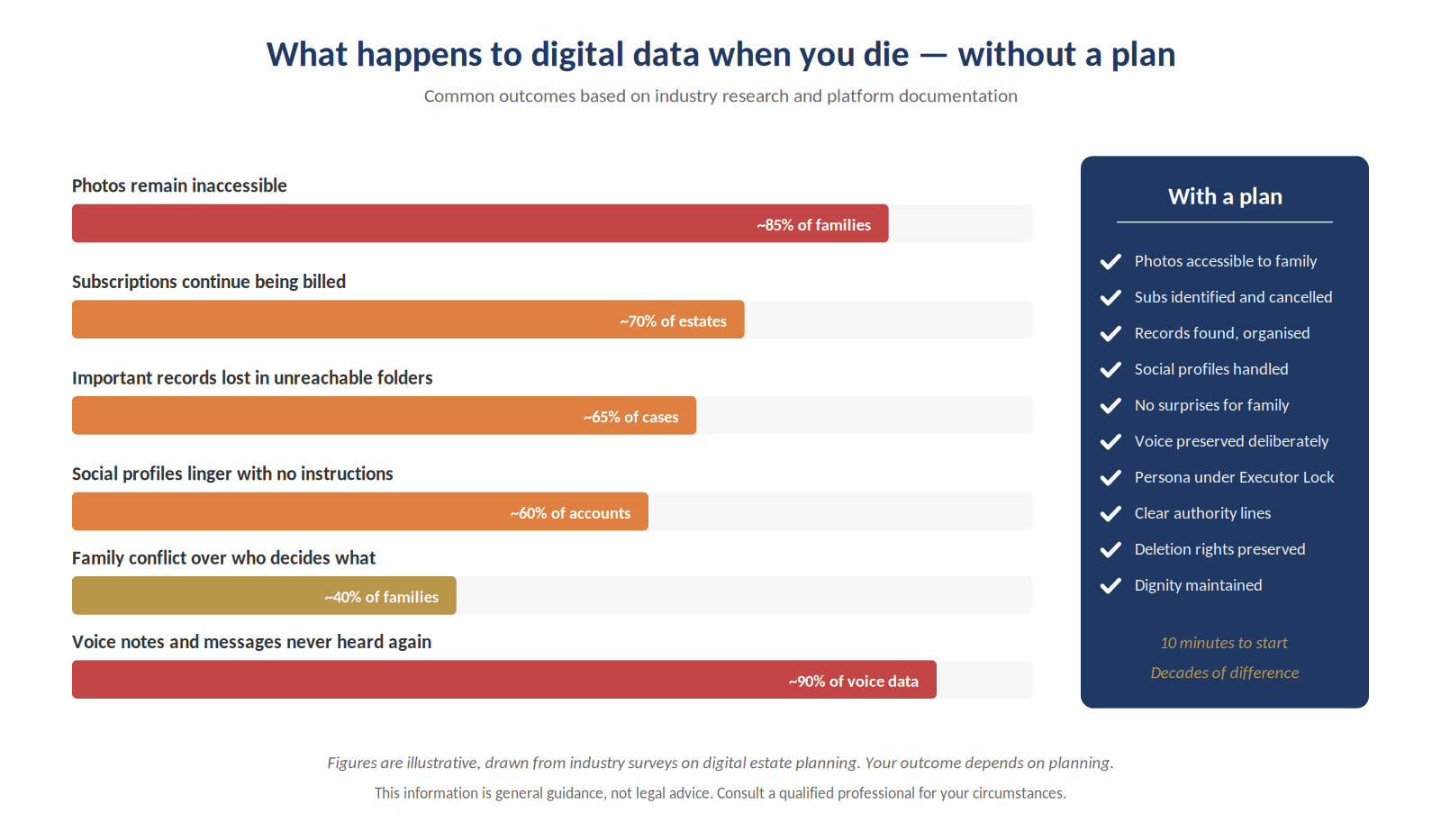
What can happen without a plan
Two hundred and forty hours of admin, in the worst weeks of their lives. A Persona spares them most of it.
Without planning, several common scenarios unfold.
Accounts are charged for years after death because nobody knew they existed.
Photos and voice recordings become inaccessible because the family cannot get past the login screen.
Social media profiles remain active, sometimes generating notifications on the deceased's birthday for people who do not know they have died.
Important records: legal documents, business records, insurance details, are lost in inaccessible folders.
AI Personas, if they exist, are accessed by family members in ways the person who created them might not have wanted.
Family conflict arises over who has authority to act, what should be deleted, what should be preserved, and on what basis.
These outcomes are not inevitable. Most are preventable with planning that does not require a lawyer, a special document, or any technical expertise. It requires only intention.
The questions to answer in advance
Good digital afterlife planning answers a defined set of questions.
What digital accounts do you have? Where are they? Who knows about them?
Which accounts contain meaningful data that your family will want to preserve? Which contain ongoing charges that should be cancelled?
Who should have access to what, and under what conditions?
What should be preserved? What should be deleted? Who has authority to decide on edge cases?
If you have an AI Persona, what permissions govern it? Who is your nominated Executor? What rules apply after Executor Lock™ activates?
Where is the password and authentication information stored? Who can access that information when needed?
How AI Personas change the picture
AI Personas are a newer layer of digital data, and they raise specific questions that ordinary file-based data does not.
Unlike a folder of photos, a Persona is interactive. It can respond to questions. It may contain voice. It may continue to operate after the creator's death, depending on how it was configured. The data it contains is more sensitive than ordinary files because it represents a person rather than just documenting them.
Afterlife AI™ is built specifically for this. The Executor Lock™ mechanism translates your pre-death configuration into post-death behaviour. Trusted Contacts can access the Persona under permissions you set. The Persona transitions to read-only governance. Deletion rights are preserved through the Executor. The whole system is designed to do what other digital services do not: govern itself, deliberately, across the boundary of death.
Start your Persona today. A Persona built on who you are. Your stories, your wishes, your values, your likeness, your voice. Create your account free.
What Afterlife AI™ does with your Persona after death
Specifically, on Afterlife AI™'s platform:
When verified evidence of death is received, and your nominated Executor has been identity-verified, Executor Lock™ activates.
Your Persona transitions to read-only governance under the permissions you configured.
Trusted Contacts you nominated retain access according to the rules you set.
Your Persona cannot be edited or rewritten by your Executor; they act within the boundaries you established.
Deletion can be requested by the Executor in writing under the Executor Lock™ Agreement, after a minimum post-lock period.
Access beyond the lock is governed by your chosen plan: the long-term plans (20-Year, 80-Year) carry the family for the remaining years of the term.
Practical steps to take now
Even if you do not yet have an Afterlife AI™ Persona, there are steps that protect your family.
Maintain a list of your significant digital accounts. Update it once a year.
Use a password manager and ensure your Executor knows how to access it.
Set up Legacy Contact on Apple, Inactive Account Manager on Google, and equivalent tools where they exist.
Decide which accounts should be closed, which should be preserved, and which should be memorialised.
Document your wishes in writing, alongside your will, in a place your family can find.
If you have an AI Persona, configure Executor Lock™ thoroughly and review it every few years.
A complete digital legacy plan does not need to be elaborate. The most useful structure has three components. A password manager with a documented emergency-access protocol. A designated executor who has been briefed on what exists and what to do with it. A clear statement, ideally documented within the relevant platform's own succession tools, about what should happen to each category of digital asset.
Layered on top of that, for the personal and emotional material, a consent-first Persona handles the preservation work that storage products cannot. The Persona holds the voice, the memories, the explicit messages for specific people. The Executor Lock™ framework handles the post-death governance. Together they cover the territory that wills, password managers, and platform succession tools leave uncovered: the question of what to remember, in what form, for whom.
Where to start
Open a note on your phone. List the digital services that contain anything meaningful to you. Beside each, write one sentence: what you want to happen to it. That note is the beginning of your digital legacy plan. Everything else is refinement.
Category by category: what is at risk
Photographs and videos. The single largest category for most families and the one that most often becomes inaccessible. Phones are locked. Cloud accounts require two-factor authentication that no one else can complete. Old hard drives sit in drawers unattached for years. The shoebox of family photographs from the twentieth century is almost always more accessible to survivors than the iPhone the deceased was holding the day before they died.
Email. The hub of digital life for most adults aged 35 and over. Contains decades of correspondence, account-recovery information, financial records, and conversations of genuine emotional weight. Platforms vary widely in their willingness to release email content to surviving family members. Most require evidence of intent that few people have documented.
Social media. Each platform has its own rules about what happens at death. Some memorialise. Some delete on request. Some lock permanently in a state of suspended animation. Almost all require the family to do the work of finding out the policy, providing evidence of the death, and navigating account-specific procedures. The default for most platforms is that nothing happens. Profiles linger. Posts keep appearing in friends' memories. The deceased keeps having birthdays in everyone's notifications.
Financial accounts. Banking platforms, investment accounts, payment apps, cryptocurrency wallets, subscription services. Each has its own process. Several have no functional process at all and rely on the executor producing paperwork that the platform may or may not accept. Cryptocurrency wallets without recovery information are unrecoverable. Subscription services often continue billing for months after death because no one knows what subscriptions existed. Our guides to Cash App and Coinbase cover two of the most common, and neither lets a customer name a beneficiary.
Cloud storage. Files in Drive, Dropbox, OneDrive, iCloud. Often the actual repository of important documents, including unfinished work, scanned originals of legal documents, family genealogy, personal writing, and creative work that has never been shared. Access depends entirely on credentials and recovery options that the deceased may or may not have documented.
Devices. Phones, tablets, laptops, desktop computers, external drives. Each potentially locked. Each potentially containing material that exists nowhere else. Each potentially the only way to access cloud services that require device-based verification.
Voice and audio. Voicemails. Voice notes. Audio recordings. As discussed elsewhere in this guide, almost universally lost when a person dies without preservation in place, despite being the form of memory the bereaved most often reach for.
Frequently asked questions
Can my family access my digital data after I die?
It depends on the platform, account type, local law and whether you have left instructions. Most platforms do not automatically grant access to family members. Planning ahead matters.
What should I include in a digital legacy plan?
Account instructions, memory preferences, trusted contacts, deletion wishes, private files, voice data and any AI Persona governance choices.
Do I need a lawyer?
Not for the digital legacy itself. For matters that intersect with your will or estate, legal advice may be appropriate.
What happens to my Afterlife AI™ Persona after I die?
It transitions to read-only governance under Executor Lock™, accessible to your nominated Trusted Contacts under the permissions you set. How long your family's access lasts depends on your chosen plan.
Can I update my digital legacy plan?
Yes, at any time. Review it whenever your circumstances change.
Related reading on this topic: what happens to your Instagram account.